Friends, if you are looking for the best and most viral Google Gemini prompts for AI photo editing, you’ve landed at the right place. In this post, I’ll share some trending retro-style photo editing prompts that will help you create professional-looking, aesthetically pleasing, and Instagram-worthy images for free.
The best part? You don’t need advanced photo editing skills or expensive software anymore. With Google Gemini AI, creating stunning images is just a few clicks away. Whether you want to edit your own photo or surprise someone with a beautifully generated image, these prompts will do the magic
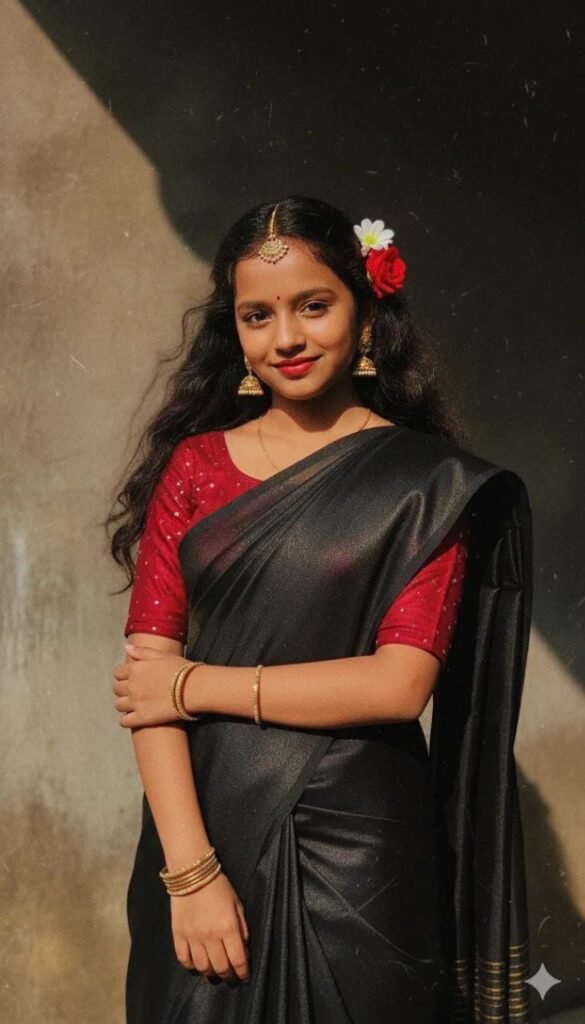
Prompt i use : Create a retro vintage grainy but bright image of the reference picture but draped a perfect black Pinteresty aesthetic retio,Retain 100% facial details from attached image, must feel like a 90’s movie red hai baddie with a small flower tuck visibly at curls and windy environment romanticisin The girl is standing against a solid walde shadows and contrast drama, creating a mysterious and artistic atmosphere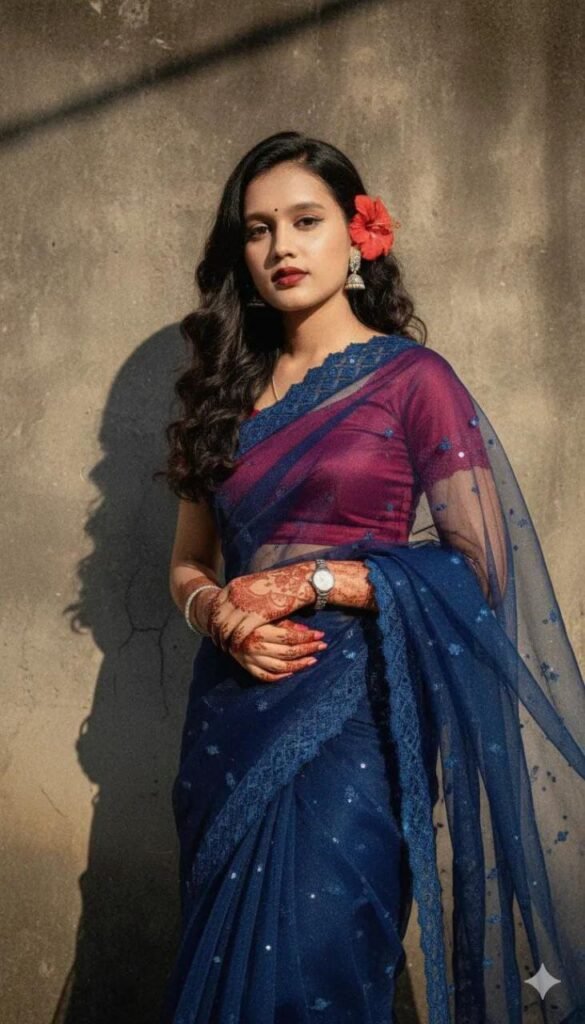
Create a retro vintage grainy but bright image of the reference picture but draped a perfect blue Pinteresty aesthetic reti? saree . it must feel like a 90’s movie red hai baddie with a small flower tuck visibly@ t curls and windy environment romanticisin The girl is standing against a solid walde shadows and contrast drama, creating a mysterious and artistic atmosphere.
Convert, 4k HD realistic, A stunning portrait of a young Indian woman with long, dark, wavy hair cascading over her shoulders. She is wearing a translucent, elegant red saree draped over one
shoulder, revealing a fitted blouse underneath. White flowers are tucked behind her right ear. She is looking slightly to her right, with a soft, serene expression. I want same face as I
uploaded no alternation 100 percent same. The background is a plain, warm-toned wall illuminated by a warm light source from the right, creating a distinct, soft-edged shadow of her profile and hair on the wall behind her. The overall mood is retro and artistic."
Ultra-realistic 4K HD portrait of a young Indian woman with long, dark, wavy hair, styled with white jasmine flowers tucked behind her right ear. She is wearing a translucent black organza saree draped elegantly over her left shoulder, revealing a fitted black sleeveless blouse underneath. She is looking to her right with a gentle, slightly smiling expression. A warm, directional spotlight from the left casts a soft, distinct shadow of her profile on a plain, warm orange-brown background, creating a vintage cinematic mood. --ar 3:4"What Is the Retro Style Vintage Photo Trend 2025?
One of the hottest trends right now is the retro vintage photo editing style. This trend has gone viral on social media because it gives pictures a timeless, cinematic look.
- Girls are using these edits for aesthetic Instagram posts, profile pictures, and creative projects.
- Boys are experimenting with Gemini prompts to create beautiful vintage portraits, sometimes even editing photos of their crushes to impress them with unique results.
The retro vintage aesthetic feels like stepping back into the golden era of the ’90s, with warm tones, grainy textures, and dramatic lighting that bring a nostalgic yet stylish vibe to every picture.
Copy-Paste Gemini Prompts for Retro Style Photo Editing
Here are some ready-to-use Google Gemini AI prompts for creating retro-style vintage photos. You can simply copy and paste them into Gemini, upload your photo, and get professional-quality edits instantly
How to Create Retro Vintage-Style Photos with Gemini AI
Follow these simple steps to create your own trending retro-style photo:
- Download Google Gemini App → Install it from Play Store or App Store.
- Sign In → Use your Google account to access Gemini AI.
- Upload a Photo → Add your own picture (or your crush’s if you’re a boy 😉).
- Paste a Prompt → Copy one of the above Gemini prompts.
- Generate the Image → Click the “Generate” button and wait a few seconds.
- Download & Share → Save the photo and share it on Instagram, Facebook, or anywhere else to get likes and comments.
What’s New in Google Gemini? (Nano Banana AI Feature)
Google has recently introduced a new feature called Nano Banana AI, and it’s a game-changer for creators. This tool enhances Gemini’s capabilities by making image generation faster, sharper, and more creative.
With Nano Banana AI, you can:
- Generate high-quality images instantly.
- Create short videos from prompts.
- Get super-fast answers to any query.
- Experiment with new artistic styles.
It’s designed for speed, accuracy, and creativity—making it perfect for AI photo editing, content creation, and viral social media visuals.
Final Thoughts
In this post, we explored the trending retro-style AI photo editing trend using Google Gemini AI prompts. I shared some viral Gemini prompts for image generation that you can directly copy and paste to create stunning, vintage-inspired photos.
With the new Nano Banana AI feature, Gemini makes editing photos easier, faster, and more stylish than ever before. Whether you want to impress your crush, go viral on Instagram, or simply explore AI creativity, these prompts will help you get the best results.
So, go ahead—try these Gemini AI photo prompts, download your images, and shine on social media!